
Skip to menu

MenuOnePOS Owner Hub

Help Center

This page is available in two languages: English (EN) and Korean (KR). English categories begin with “EN,” and Korean categories begin with “KR.”

이 페이지는 영어(EN)와 한국어(KR) 두 가지 언어로 제공됩니다. 영어 카테고리는 EN으로, 한국어 카테고리는 KR로 시작합니다.


Views 1 Votes 0 Comment 0
?

Shortcut

PrevPrev Article

NextNext Article

Larger Font Smaller Font Up Down Go comment Print Attachment
?

Shortcut

PrevPrev Article

NextNext Article

Larger Font Smaller Font Up Down Go comment Print Attachment

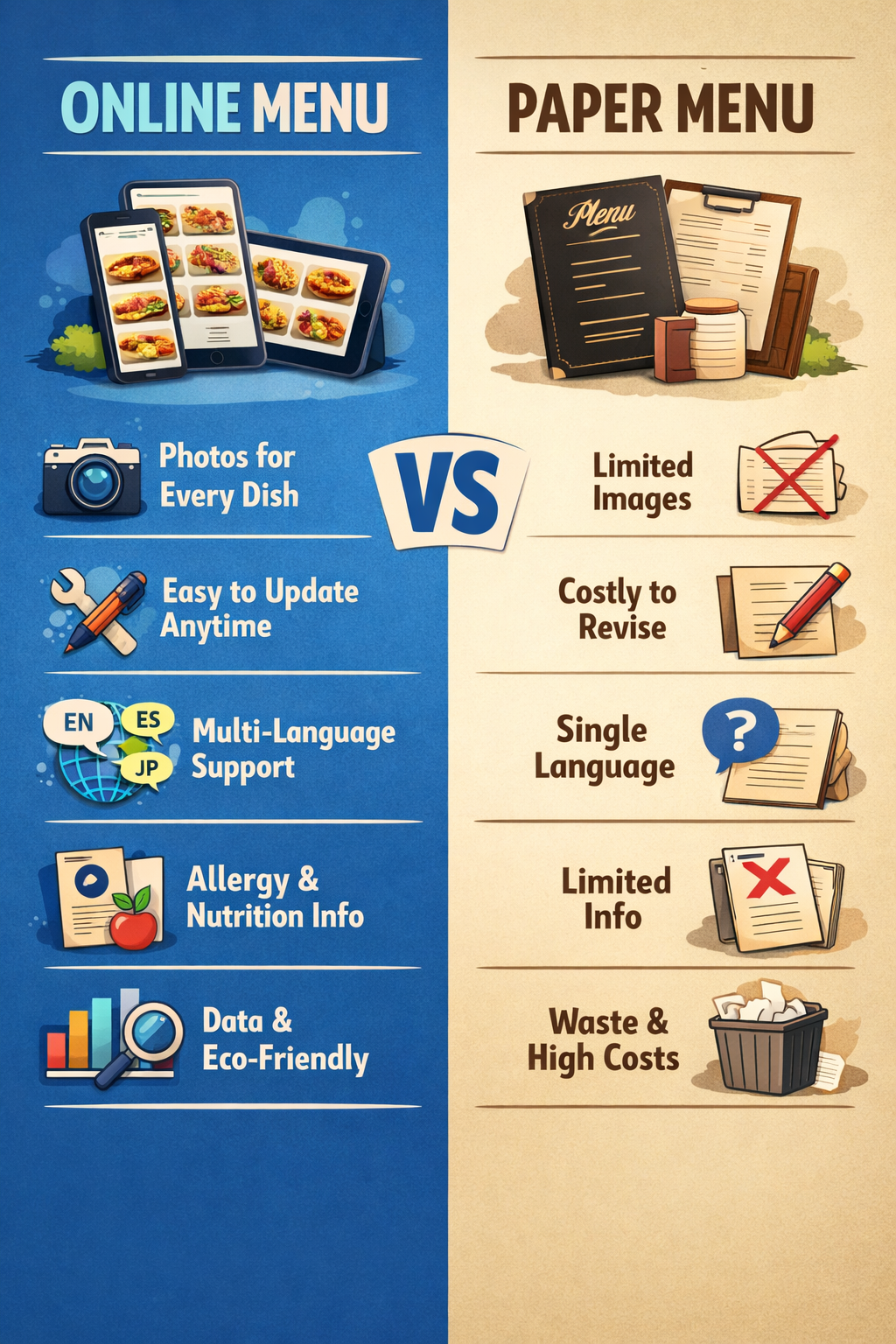
menu-online-paper.png

🌐 Smarter Restaurant Operations with Online Menus

An online menu is more than a digital replacement for paper menus.
It is a powerful tool that enhances operational efficiency and elevates the customer experience — the new standard for modern dining.

With an online menu, you can display high‑quality photos for every dish and update, add, or remove items instantly without any hassle. When you modify your POS menu, the changes are automatically reflected in online orders and QR orders in real time, eliminating the need for manual updates.

You also save on recurring costs such as menu covers and printing, while reducing the time and effort required for menu revisions by more than 90%.
Beyond these benefits, online menus offer features that traditional paper menus simply cannot match:

  • Real‑time price and menu adjustments to respond quickly to ingredient costs or seasonal items
  • Multi‑language support for international customers
  • Detailed allergen and nutrition information to build customer trust
  • Menu search and smart recommendations that increase order conversion and average spend
  • Rich media options including photos, videos, and GIFs to showcase dishes more vividly
  • Accessibility features that make the menu easier for everyone to use
  • Customer behavior analytics to understand clicks, popular items, and improve menu strategy
  • Eco‑friendly operation that strengthens your brand image

Online menus are not just a digital upgrade —
they are the most effective way to boost your restaurant’s competitiveness.


You can click the WhatsApp button at the bottom right, or send a short text message to 1‑778‑655‑4249 (Text Only). Our representative will get back to you as soon as possible.


Owner Guide Center

MenuOnePOS Owner Hub

  1. 19May
    by admin
    in FAQ-EN
    Views 2 

    Bridge Service vs. MenuOnePOS — Comparison Guide

  2. 19May
    by admin
    in FAQ-KR
    Views 1 

    Bridge Service vs. MenuOnePOS 비교 안내

  3. 18May
    by admin
    in FAQ-EN
    Views 1 

    Smarter Restaurant Operations with Online Menus

  4. 18May
    by admin
    in FAQ-KR
    Views 1 

    온라인 메뉴로 완성하는 더 스마트한 매장 운영
  5. 16May
    by admin
    in FAQ-EN
    Views 38 

    📊 Computer POS vs Cloud POS Comparison Table

  6. 16May
    by admin
    in FAQ-KR
    Views 7 

    📊 컴퓨터 POS vs 클라우드 POS 는 어떻게 다른가?

  7. Printing Setup Guide: Checking POS Printer Status for MenuOnePOS

  8. MenuOnePOS 인쇄 설정을 위한 POS 프린터 정보 확인 방법

  9. 오너앱 주문 확인 방법 — 비디오 데모

  10. Check Orders in the Owner App — Video Demo

  11. 07May
    by admin
    in POS-EN
    Views 47 

    How to Update Item Prices (Video Guide)

  12. No Image 30Apr
    by admin
    in Printer-EN
    Views 60 

    How to Check the Wi‑Fi Network Name (SSID) on an Android Tablet

  13. No Image 30Apr
    by admin
    in Printer-KR
    Views 59 

    안드로이드 패드에서 Wi‑Fi 네트워크 이름 확인하기

  14. 레스토랑 오너앱 설치방법

  15. Download Owner App

  16. No Image 19Apr
    by admin
    in Printer-KR
    Views 85 

    기존 Ethernet POS 프린터를 앱에 연결하는 방법

  17. No Image 19Apr
    by admin
    in Printer-KR
    Views 79 

    Owner App – 블루투스 프린터 설정 가이드

  18. No Image 19Apr
    by admin
    in Printer-KR
    Views 64 

    이더넷 프린터 설치

  19. No Image 18Apr
    by admin
    in Printer-EN
    Views 85 

    How to Connect Your Existing Ethernet POS Printer to Our App

  20. No Image 17Apr
    by admin
    in Printer-EN
    Views 69 

    Network (IP) Thermal Printer Setup for Owner App

Board Pagination Prev 1 2 Next
/ 2
SCROLL TOP
