

The MenuOnePos Plug & Play Kit is fully pre‑configured and ready to use right out of the box.
Simply power it on, connect your devices, and start receiving online orders instantly—no technical setup required.
Table QR Order
Table QR Ordering
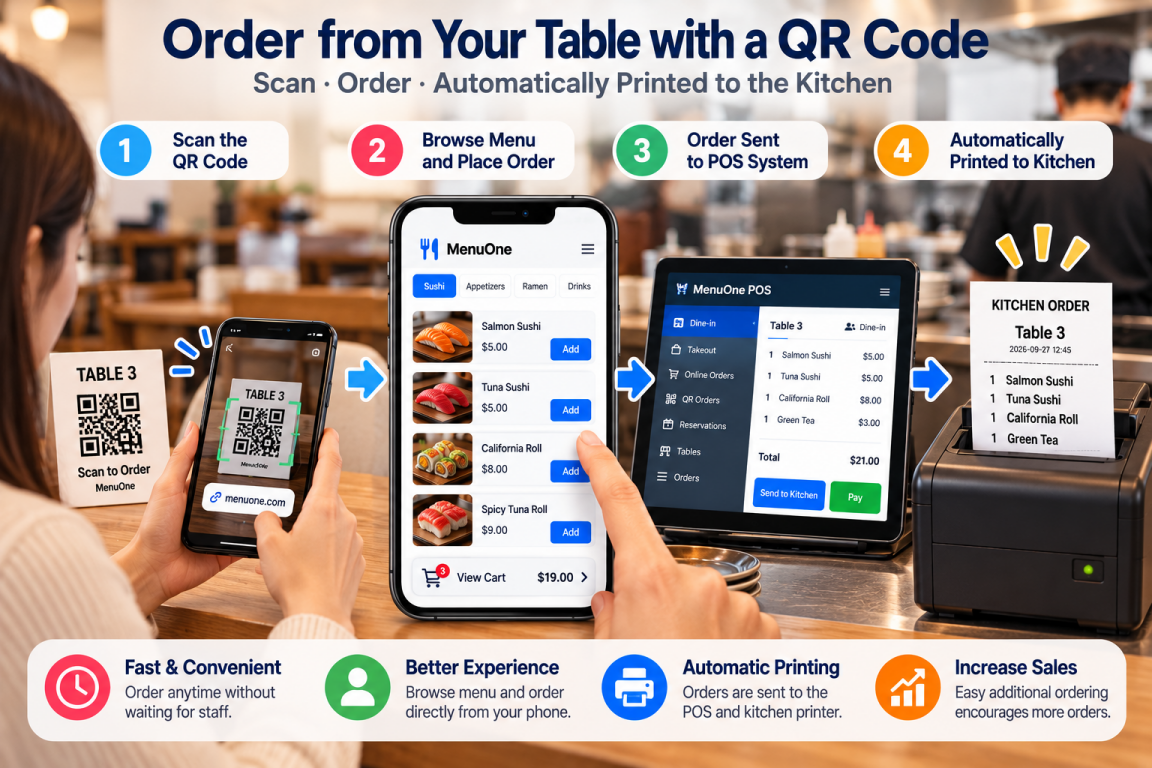
Benefits of Table QR Code Ordering
Table QR Code Ordering allows customers to browse the menu, place orders, and request additional items directly from their own smartphones — without waiting for staff assistance or requiring a dedicated ordering tablet at every table.
As restaurants continue to face rising labor costs and operating expenses, QR ordering provides a simple and affordable way to improve efficiency while delivering a convenient, modern dining experience.
1. Faster Service and Improved Customer Experience
Customers simply scan the QR code at their table and start ordering immediately.
There is no need to wait for a server to bring a menu or take the initial order, helping restaurants provide faster service during both normal and busy periods.
2. Reduce Labor Requirements
By allowing customers to place their own orders, restaurants can reduce the amount of time staff spend repeatedly taking orders.
Employees can focus more on food delivery, customer service, cleaning, and table maintenance.
This can be especially valuable as restaurants face increasing labor costs and difficulty maintaining sufficient staffing levels.
3. Easy Additional Ordering
Customers can place additional orders at any time during their meal without having to find or wait for a server.
Want another drink, appetizer, side dish, or dessert?
Simply open the QR menu and order again.
Making additional ordering easier can also create more opportunities for spontaneous purchases and increase average spending per table.
4. Improved Order Accuracy
Orders are entered directly by customers and electronically transmitted to the restaurant system.
This helps reduce errors that can occur when an order is verbally communicated to a server and then entered again into the POS.
Customers can review their selections before submitting the order, further helping improve accuracy.
5. Increase Sales Opportunities
The digital menu can display featured items, popular dishes, drinks, desserts, add-ons, and special promotions directly to customers while they are ordering.
Restaurants can use these opportunities to encourage additional purchases without requiring staff to verbally promote every item.
6. Real-Time Menu Updates
Menu changes can be reflected digitally without replacing printed menus.
Restaurants can update:
-
Menu items
-
Prices
-
Item availability
-
Featured items
-
Promotions
-
Descriptions
Customers then see the updated information through the QR ordering menu.
There is no need to reprint physical menus every time information changes.
7. Multi-Language Support
Digital QR menus can support multiple languages, making the ordering process easier for tourists and customers from different language backgrounds.
Customers can browse the menu more comfortably without requiring restaurant staff to translate each item individually.
8. Integrated with POS and Kitchen Operations
QR orders can become part of the same restaurant ordering workflow rather than operating as a completely separate ordering system.
Orders can be routed to the restaurant POS and appropriate kitchen printing workflow, helping staff process QR orders alongside other restaurant orders.
9. No App Download Required
Customers do not need to install another restaurant app just to place an order.
They simply scan the table QR code with their smartphone and access the ordering page.
This removes an unnecessary step and makes the service easier for first-time customers.
10. No Ordering Tablet Required at Every Table
Some self-ordering systems require a dedicated tablet to be permanently installed at every table.
That means a restaurant with 30 tables may need as many as 30 ordering devices — even when only a portion of those tables are occupied.
With QR Ordering, the customer's own smartphone becomes the ordering device.
The restaurant does not need to purchase a dedicated ordering tablet for every table.
11. Avoid Paying for Hardware That Sits Unused
Restaurant traffic changes throughout the day.
During slower hours, a restaurant may use only part of its available seating. A tablet-based table ordering system, however, still requires dedicated hardware to be installed across the tables that may eventually be needed during busy periods.
Some restaurants may choose to power down unused table devices or seat customers in sections where ordering tablets are already active. But the restaurant has still purchased those devices and must continue to maintain them.
QR Ordering takes a different approach:
Use the customer's smartphone when the customer is actually seated at the table.
Whether 5 tables or 50 tables are occupied, there is no need to keep a dedicated ordering device running at every table.
12. Reduce More Than Just the Purchase Cost
The cost of table ordering hardware is not limited to the initial tablet purchase.
Dedicated tablets may also require:
-
Charging and electricity
-
Charging cables and adapters
-
Device mounts or stands
-
Wi-Fi configuration
-
Battery maintenance
-
Cleaning and device management
-
Repairs
-
Replacement of damaged or aging devices
With QR Ordering, restaurants can avoid much of this table-by-table hardware overhead.
A printed QR code requires no charging, no battery, and no electrical outlet.
13. No Need to Choose Between Enough Tablets and Too Many Tablets
A restaurant using dedicated table tablets faces a practical problem.
Buying fewer tablets may reduce costs, but there may not be enough devices when the restaurant becomes busy.
Installing a tablet at every table solves the busy-period problem, but many of those devices may sit unused during slower periods.
QR Ordering naturally adjusts to restaurant traffic.
Few customers? Only a few QR codes are being used.
Full restaurant? Every table can order at the same time.
No additional ordering hardware needs to be activated simply because more tables become occupied.
14. Supports Multiple Orders Per Table
Each QR code can be associated with a specific table.
Customers can continue placing additional orders throughout their visit, with orders associated with the appropriate table.
This makes QR Ordering suitable not only for the first order but also for ongoing table service.
15. Built-In Staff Call Function
Not every customer request is a food order.
Customers can use their phone to request common services such as:
-
Water Refill
-
Extra Napkins
-
Bill Request
-
Server Assistance
This helps staff understand what the customer needs before making an unnecessary trip to the table.
16. Keep Human Service Where It Matters
QR Ordering does not have to replace restaurant staff.
Instead, it can reduce repetitive tasks such as taking routine orders and additional orders.
Staff can spend more time on the parts of restaurant service where human interaction provides greater value — welcoming guests, delivering food, solving problems, and providing personal service.
17. Plug & Play Installation
MenuOne QR Ordering can be prepared and configured before deployment.
Table information, QR ordering configuration, and restaurant settings can be prepared in advance so the restaurant can begin using the service with minimal setup.
There is no need to install and configure a dedicated ordering tablet at every table.
QR Ordering vs. Dedicated Table Tablets
The difference is simple:
Tablet Ordering
Restaurant buys the device → installs it → powers it → charges it → maintains it → replaces it.
QR Ordering
Customer sits down → scans the QR code → uses their own smartphone → places the order.
A restaurant should not have to maintain dozens of ordering devices simply to be prepared for the busiest few hours of the week.
Use Technology Only When the Table Needs It
A restaurant may have 30 tables, but that does not mean all 30 tables are occupied all day.
With dedicated table tablets, the restaurant pays for hardware based on its maximum seating capacity.
With QR Ordering, the ordering technology is effectively activated by the customer only when a table is being used.
That makes QR Ordering especially practical for restaurants whose traffic changes significantly between lunch, dinner, weekdays, weekends, and peak periods.
The Smart Way to Modernize Table Service
Table QR Code Ordering combines convenience, efficiency, and lower hardware requirements.
It helps restaurants reduce repetitive staff work, simplify additional ordering, improve order accuracy, and provide customers with a modern self-ordering option.
Most importantly, restaurants do not need to fill every table with expensive electronic equipment.
No tablet at every table.
No device to charge at every table.
No hardware sitting unused during slow hours.
Customers already carry the ordering device in their pocket.
All they need to do is scan and order.